Starting a blog in Nigeria is not complicated. But most guides assume you have a dollar card, a US address, and patience for foreign checkout pages that decline your Verve card at 11pm. This guide is different.
Every tool, host, and payment method in this article works with Nigerian naira, Nigerian cards, and Nigerian phone numbers. No PayPal required. No dollar-denominated subscriptions. No “this service is not available in your region.”By the end of this guide on how to start a blog in Nigeria, you will have:
- A registered domain name (₦5,500 or less)
- Web hosting that accepts your Nigerian card
- A live WordPress blog
- Your first published post
- A professional email address (@yourblog.com.ng)
Total time: 2–3 hours. Total cost: ₦10,500–18,000 for the first year.
Step 1: Choose Your Blog Niche (15 Minutes)
Before you buy anything, know what you’re writing about. The most common reason Nigerian blogs fail is not technical — it’s that the writer runs out of things to say after 5 posts.
Niche Ideas That Work in Nigeria
| Niche | Why It Works | Monetization Path |
|---|---|---|
| Personal finance | High search volume, CBN rate anxiety | Affiliate marketing, courses |
| Tech tutorials | Growing digital economy | Sponsored posts, affiliates |
| Food & recipes | Universal appeal, visual | AdSense, sponsored content |
| Career & jobs | High unemployment context | Job board, courses |
| Faith & devotion | Large Nigerian audience | Books, speaking, donations |
| Parenting | Growing middle class | Affiliates, sponsored posts |
| Fashion & beauty | Strong Instagram crossover | Brand deals, affiliates |
| Education | JAMB, WAEC, scholarships | Courses, ebooks |
The test: Can you write 50 post ideas right now? If not, narrow your niche further.
Our recommendation: Start with what you already know. If you’re a banker writing about personal finance, or a developer writing about tech, your expertise carries you through the early posts when traffic is zero.
Step 2: Choose a Domain Name (20 Minutes)
Your domain is your address on the internet. For Nigerian bloggers, you have three main options:
Option A: .com.ng (Recommended for Nigerian Audiences)
- Cost: ₦5,500/year (free with annual hosting on most hosts)
- Best for: Blogs targeting Nigerian readers
- Why: Signals local relevance. Easier to rank for Nigeria-specific searches.
- Example: naijafinance.com.ng, lagosfoodie.com.ng
Option B: .ng (Premium)
- Cost: ₦13,500/year
- Best for: Brands that want a short, premium domain
- Why: Shorter, more prestigious. But 2.5x the price of .com.ng.
- Example: tech.ng, eats.ng
Option C: .com (Global)
- Cost: ₦10,000–12,000 the first year and higher upon renewal
- Best for: Blogs with international ambitions
- Why: Global standard. Better for diaspora readers.
- Example: nigeriantech.com, abujamoms.com
How to Choose
- Keep it short: Under 15 characters if possible
- Avoid hyphens: naija-finance.com.ng looks cheap
- Make it pronounceable: Can someone say it over the phone?
- Check social media: Is the handle available on Instagram and Twitter?
- Search trademark databases: Don’t pick a name that belongs to a Nigerian bank or telecom
Where to register:
- Truehost: .com.ng at ₦5,500, free with annual hosting
- Whogohost/GO54: .com.ng free with annual hosting
- HostAfrica: .com.ng free with hosting
Step 3: Buy Web Hosting (30 Minutes)
Hosting is where your blog lives. For Nigerian bloggers, four hosts stand out in 2026:
| Host | Best For | Entry Price | Nigerian Card? | Support |
|---|---|---|---|---|
| Truehost | Most new bloggers | ₦1,275/mo | ✅ Reliable | WhatsApp, chat, phone |
| Hostinger | International audience | ₦990/mo | ⚠️ Occasional decline | Live chat, AI |
| GO54 | Cheapest first year | ₦875/mo (promo) | ✅ Reliable | Chat, email |
| HostAfrica | Monthly flexibility | ₦4,500/mo | ✅ Reliable | Chat, ticket |
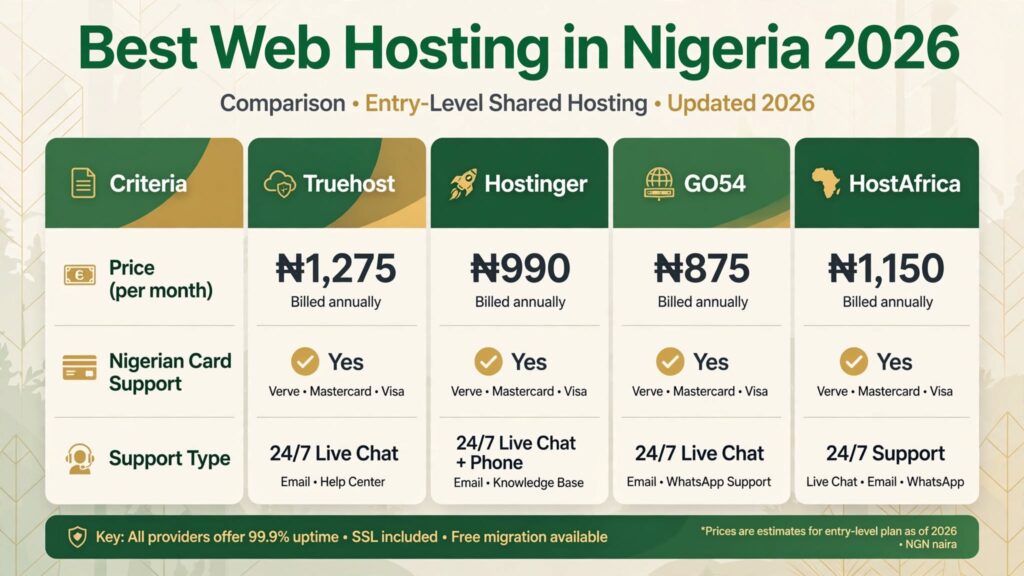
Our recommendation for beginners: Truehost Starter.
Why:
- Reliable Nigerian card checkout (no declines)
- WhatsApp support you can reach at midnight
- Unlimited bandwidth (no viral-post anxiety)
- Free .com.ng domain with annual plan
- cPanel (familiar, well-documented)
- 30-day money-back guarantee
What you need to buy:
- Hosting plan (Starter is enough for a new blog)
- Domain name (free with annual plan)
- Nothing else. Skip the “SEO tools,” “site lock,” and “backup upgrades” upsells. You get free SSL and daily backups included.
Total first-year cost with Truehost:
- Triennial billing: ₦45,900 (₦1,275/month effective)
- Annual billing: ₦18,000 (₦1,500/month effective)
- Plus free .com.ng domain
If ₦45,900 is too much upfront, go annual. You can always upgrade your billing term later.
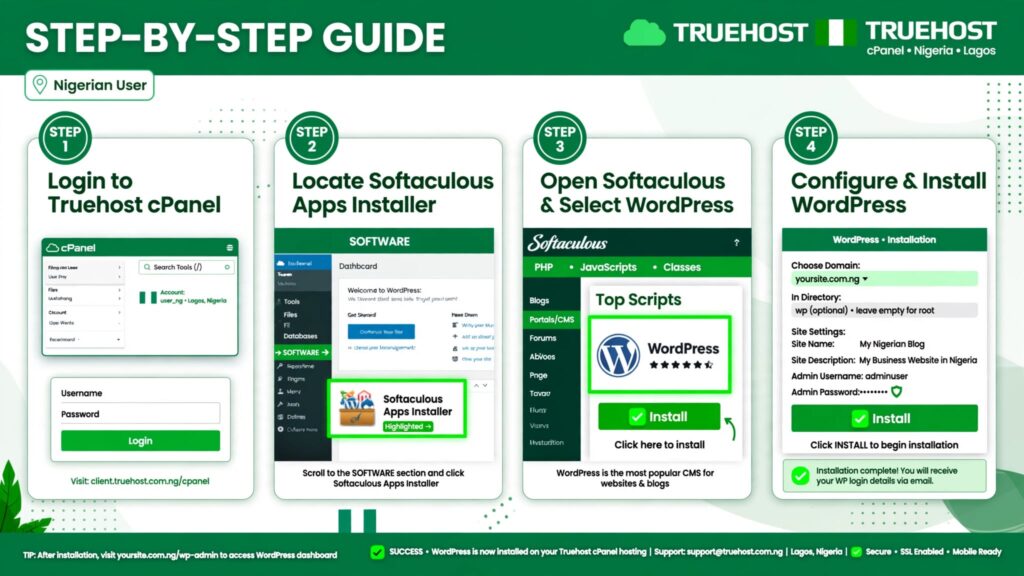
Step 4: Install WordPress (10 Minutes)
WordPress powers 43% of the internet. It’s free, open-source, and what virtually every Nigerian blogger uses.
Installing WordPress on Truehost (cPanel)
- Log into your Truehost account
- Click “cPanel”
- Find “Softaculous Apps Installer” (usually near the top)
- Click “WordPress”
- Click “Install Now”
- Fill in the form:
- Choose Protocol: Select “https://” (SSL is already active)
- Choose Domain: Select your domain
- In Directory: Leave blank (installs to root)
- Site Name: Your Blog Name
- Site Description: Short tagline
- Admin Username: NOT “admin” — pick something unique
- Admin Password: Strong password (save this)
- Admin Email: Your real email
- Click “Install”
- Wait 1–2 minutes. You’ll get a confirmation with your login URL.
Your WordPress login URL: yourdomain.com.ng/wp-admin
Step 5: Choose and Install a Theme (30 Minutes)
A theme controls how your blog looks. For Nigerian bloggers, these free themes work well:
| Theme | Best For | Why |
|---|---|---|
| Astra | All-purpose blogs | Lightweight, fast, customizable |
| GeneratePress | Speed-focused blogs | Fastest free theme available |
| Kadence | Design flexibility | Great header/footer builder |
| Neve | Beginners | Simple, clean, mobile-first |
How to install:
- Log into WordPress (yourdomain.com.ng/wp-admin)
- Go to Appearance → Themes → Add New
- Search for “Astra”
- Click “Install” then “Activate”
- Go to Appearance → Astra Options → Install Starter Templates
- Choose a blog template you like
- Import it (takes 2–3 minutes)
Don’t overthink this. Your first theme doesn’t need to be perfect. You can change it later without losing your posts.
Step 6: Install Essential Plugins (20 Minutes)
Plugins add features to WordPress. For a new blog, you only need these:
Must-Have Plugins
| Plugin | What It Does | Why You Need It |
|---|---|---|
| LiteSpeed Cache | Speed optimization | Truehost uses LiteSpeed servers; this plugin is built for them. Makes your blog load fast. |
| Rank Math SEO | Search engine optimization | Helps you write posts that Google understands. Free version is enough to start. |
| UpdraftPlus | Backups | Backs up your site to Google Drive or email. Free daily backups are automatic, but this is your safety net. |
| WPForms | Contact forms | Lets readers contact you. Lite version is free. |
How to install:
- In WordPress, go to Plugins → Add New
- Search for each plugin name
- Click “Install Now” then “Activate”
- For LiteSpeed Cache: Go to LiteSpeed Cache → Cache → Enable
- For Rank Math: Follow the setup wizard (takes 5 minutes)
Plugins to avoid as a beginner:
- Page builders (Elementor, Divi) — they slow down your site. Learn basic WordPress first.
- Security plugins — your host already handles this.
- Backup plugins (if your host does daily backups) — UpdraftPlus is just extra insurance.
- Social media auto-posters — post manually while you’re small.
Step 7: Create Key Pages (30 Minutes)
Before you write posts, create these four pages:
1. Home Page
If you imported an Astra starter template, this is already done. If not:
- Go to Pages → Add New
- Title: “Home”
- Add a brief welcome paragraph
- Go to Settings → Reading → Set “Home” as your homepage
2. About Page
This is the most-read page on most blogs. Write:
- Who you are
- Why you started the blog
- What readers will learn
- A photo of yourself (builds trust)
Example structure:
“Hi, I’m [Name]. I started [Blog Name] in 2026 because I was tired of [problem]. Here, I share [what you share]. Whether you’re [target reader], you’ll find [benefit].”
3. Contact Page
- Install WPForms (done in Step 6)
- Go to WPForms → Add New → Simple Contact Form
- Copy the shortcode
- Create a new page called “Contact”
- Paste the shortcode
- Publish
4. Privacy Policy
- Go to Pages → Add New
- Title: “Privacy Policy”
- Use a free generator like privacypolicygenerator.info
- Customize for Nigeria (mention NDPR compliance)
- Publish
Step 8: Write and Publish Your First Post (45 Minutes)
This is where most people freeze. “What should my first post be?”
First Post Ideas That Work
| Niche | First Post Idea |
|---|---|
| Personal finance | “5 Money Mistakes Every Nigerian Salary Earner Makes” |
| Tech | “How I Built My First Website for Under ₦20,000” |
| Food | “The Only Jollof Rice Recipe You Need (Tested 50 Times)” |
| Career | “I Applied to 100 Jobs in Lagos: Here’s What I Learned” |
| Faith | “3 Prayers That Changed My Perspective on Delay” |
| Parenting | “What Nobody Tells You About Nigerian Daycare Costs” |
Writing Structure That Ranks
- Hook (first 2 sentences): Address the reader’s problem directly
- Promise: Tell them what they’ll learn
- Body: Use subheadings (H2, H3). Short paragraphs (2–3 sentences). Bullet points.
- Conclusion: Summarize. Ask a question to encourage comments.
- Call to action: “Subscribe to my newsletter” or “Leave a comment”
Example opening:
“If you’re earning ₦200,000 a month in Lagos and still broke by the 25th, you’re not alone. I was exactly there in 2024. Here’s what changed.”
Publishing Checklist
- Title is under 60 characters
- Featured image is 1200×630 pixels (use Canva free)
- URL slug is short (yourdomain.com.ng/money-mistakes)
- Meta description is set (Rank Math helps with this)
- Post is categorized
- You clicked “Publish”
Step 9: Set Up Your Professional Email (10 Minutes)
A branded email (you@yourblog.com.ng) looks more professional than Gmail for business inquiries.
Creating Email on Truehost (cPanel)
- Log into cPanel
- Go to “Email Accounts”
- Click “Create”
- Enter your desired address (e.g., hello, contact, yourname)
- Set a strong password
- Choose mailbox size (leave default)
- Click “Create”
Accessing your email:
- Webmail: yourdomain.com.ng:2096
- Or set up in Gmail: Settings → Accounts → Check mail from other accounts
- Or use your phone’s mail app
Pro tip: Create two emails:
- hello@yourblog.com.ng (for readers)
- media@yourblog.com.ng (for press/sponsored post inquiries)
Step 10: Connect Google Search Console (15 Minutes)
Google Search Console tells you what people search to find your blog. It’s free and essential.
- Go to search.google.com/search-console
- Click “Start Now”
- Enter your domain (yourdomain.com.ng)
- Verify ownership via DNS record
- Truehost support can help if you get stuck (WhatsApp them)
- Submit your sitemap: yourdomain.com.ng/sitemap.xml
Rank Math automatically creates your sitemap. Go to Rank Math → Sitemap Settings to find the URL.
What to Do in Your First Month
| Week | Action |
|---|---|
| Week 1 | Publish 2 more posts (3 total). Share on WhatsApp status and Twitter. |
| Week 2 | Set up Google Analytics (free). Learn what posts people read. |
| Week 3 | Comment on 10 Nigerian blogs in your niche. Leave thoughtful replies. |
| Week 4 | Publish 2 more posts. Apply for Google AdSense (you need 15–20 posts). |
Don’t worry about traffic yet. Your first 10 posts are practice. No one finds a new blog in month one unless you actively promote it.
Costs Summary: First Year
| Item | Cost | Notes |
|---|---|---|
| Domain (.com.ng) | ₦0 | Free with annual hosting |
| Hosting (Truehost Starter, annual) | ₦18,000 | Or ₦45,900 triennial |
| WordPress | ₦0 | Free |
| Theme (Astra) | ₦0 | Free version |
| Plugins | ₦0 | All recommended are free |
| Canva (images) | ₦0 | Free version |
| Total First Year | ₦18,000 | Or ₦45,900 for 3 years |
Monthly cost: ₦1,500/month (annual) or ₦1,275/month (triennial). Less than the cost of two plates of rice and chicken.
Common Mistakes to Avoid
- Buying hosting before choosing a niche
You’ll waste money on a domain you outgrow in 3 months. - Installing too many plugins
Every plugin slows down your site. Start with 4–5 max. - Writing about everything
“Lifestyle” blogs with no focus rarely gain traction. Pick a lane. - Ignoring mobile readers
70%+ of Nigerian internet traffic is mobile. Preview every post on your phone before publishing. - Comparing yourself to 5-year-old blogs
Their 10,000 monthly visitors took years to build. Focus on writing, not metrics. - Quitting after 5 posts
Most Nigerian blogs that fail do so because the writer stops, not because of technical problems.
FAQ
Do I need coding skills?
No. WordPress + cPanel + page builders mean you never touch code. If you can use Microsoft Word, you can use WordPress.
Can I start with a free host?
Technically, yes (WordPress.com free plan, Blogger). But you can’t use a custom domain, you can’t monetize properly, and you don’t own your content. For ₦18,000/year, buy proper hosting. If you’re planning to build a static website, CloudFlare Pages allows you to host it for free forever, even if you’re using it for commercial purposes. We’ll create a guide for that.
How long until I make money?
Realistically: 6–12 months of consistent posting. Google AdSense requires traffic. Affiliate marketing requires trust. Sponsored posts require an audience. There’s no shortcut.
Can I use my phone to blog?
Yes, but it’s frustrating. WordPress has a mobile app, but writing long posts on a phone is inefficient. An ₦80,000 laptop is a better investment than a ₦200,000 phone if you’re serious about blogging.
What if my domain name is taken?
Add a word: “the,” “my,” “official,” or your city. naijafinance.com.ng taken? Try thenaijafinance.com.ng or naijafinanceblog.com.ng.
Do I need to register my blog with the CAC?
Not immediately. If you’re just blogging as a hobby, no. If you start earning significant income (₦500,000+/year), register as a business for tax purposes. See our Nigerian Blogger Tax Guide.
Can I change my domain later?
Yes, but you’ll lose SEO rankings. Pick carefully from day one.
Next Steps
- Choose your niche (15 minutes)
- Search your domain using the link below
- Buy hosting (Truehost recommended for beginners)
- Install WordPress (10 minutes)
- Write your first post (today)